Ch99.2: Your own (time limit) quest
My laziness has reached a new level.
Appendix ‐‐ Making your own (time limit) quest
With this article, you will be able to add any Sortie, PvP or Expedition quest yourself.
To define a new quest for kcauto_custom, you'll need to provide:
- Quest info
- Quest requirement
- Quest specify Noro6 tag (if needed)
- Quest priority
Which are handled by the following files:
data/quests/kc3_quests_en.jsondata/quests/quests.jsondata/combat/map_enum.jsondata/quests/<type>_quest_priority.json
Quest info -- kc3_quests_en
As the name suggested, this file comes from KC3,
you can find the file here and simply copy&paste,
or kcauto_custom does provide a mini tool in tool/quest/update_kc3_quests_en.py,
run the script and it will update the file for you,
be aware it usually takes a few days for KC3's dev to update latest quests.
This file provide the basic quest info used by CUI and the quest id we will need later.
Quest info comes from KC3
Quest requirement -- quests.json
Now we define the quest in quest.json, this file contains the details of a quest.
You can always take a look in other quests in data/quests/quests.json if you need any examples.
  "1234B1": {                      #The quest name, copy from kc3_quests_en
    "id": 999,                     #The quest id, copy from kc3_quests_en
    "type": "weekly",              #The quest type, valid values are "daily", "weekly", "monthly", "other"
    "recommended_map": [           #(sortie only) The map which kcauto-custom will sortie to if no instruction is provided by poi
      "1234B1-1-1",
      "1234B1-1-2",
      "1234B1-1-3"
    ],
    "expedition_context": [        #(expedition only) The expedition which kcauto-custom will head to if no instruction is provided by poi
      29,
      30,
      131,
      133
    ]
    "intervals": [1, 0, 0],        #(optional) Intervals between kcauto-custom checking if the quest is finished, with the order as [sortie, pvp, expedition],
    "fleet_composition": {...}     #(optional) The fleet requirement of this quest
  },
a. quest name
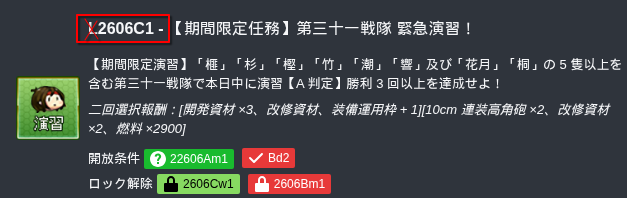
You can find the quest name checking poi's quest plugin,
for example, the following time limit PvP quest is 2606C1 (without the L)

b. quest id
Open data/quests/kc3_quests_en.json, search for quest name above,
you will find the quest id, we will use "2507C1" as example.
...
    "380": {       <= the id we are looking for
        "code": "2507C1",
        "name": "Weekly [Time-limited] Landing Fleet Escort Exercises!",
        "desc": "Secure 3 A-Rank+ victories in Exercises within the same day using either an LHA and 2 DE OR 3 DE, and up to 3 additional ships.",
        "memo": "\u27a3Rewards:\n\u00B6First choice: Either three Buckets OR a Screw OR a Combat Ration\n\u00B6Second choice: Either three Development Materials OR two Type 94 Depth Charge Projectors OR a Type 3 Depth Charge Projector"
    },
...
c. quest type
The tab of which this quest belongs to, valid values are "daily", "weekly", "monthly", "other"
d. recommended_map (Sortie quest only)
Shows the map which kcauto-custom will sortie to.
The naming rule is simple, "<quest name>-<map>"
For example, quest 2509B5 require S-rank in 4-2, 4-3, 4-4:
    "recommended_map": [
      "2509B5-4-2",
      "2509B5-4-3",
      "2509B5-4-4"
    ]
e. expedition_context (Expedition quest only)
Shows the expedition id which kcauto-custom will head to.
You can find expedition ID for A1, B2 etc. in kcauto/kca_enums/expeditions.py
For example, quest Dy7 require expedition to 29, 30, D1, D3:
    "expedition_context": [
      29,
      30,
      131,
      133
    ]
f. fleet_composition (optional, not suggested)
This item shows the fleet requirement of the quest,
if the current fleet does not match the requirement here,
kcauto_custom would not apply for this quest, which means quest slots are use more wisely.
However, it is more complicate to setup that I would say it does not worth it in time limit quest,
you could find the detail definition in reference/fleet_composition_documentation.md.
"fleet_composition": {...} #(optional) The fleet requirement of this quest
Noro6 tag -- map_enum.json (Sortie quest only)
This step is only needed when this is a sortie quest,
AND when you do need a dedicate noro6 config for this quest.
data/combat/map_enum.json contains all the sortie map kcauto_custom would handle,
this is also the name tag for every sortie noro6 config.
If you added maps in recommended_map above, you will need to add it here too.
The naming rule is simple,
"W<map>-<quest name>" : "<quest name>-<map>"
For example:
    "W2_2_A": "B-2-2-A",
    "W6_4": "B-6-4",
    "W2_5_Bm1": "Bm1-2-5",
    "W4-4-2509B5": "2509B5-4-4",
    "W2-3-2412B5": "2412B5-2-3",
quest_priority
The last one is data/quests/<type>_quest_priority.json, it defines what quest kcauto-costom will prioritizes over the others:
Naming does not matter and the priority sort in descend order.
( "2412B5" > "2509B5" > "Bm1" ... etc.)
{

  "time_limited": [
    "2412B5",
    "2509B5"
  ],
  "exact_ship_and_map": [
    "Bm1",
   ...
    "By15"
  ],
  "exact_ship_type_and_map": [
    "Bm3",
...
    "By11"
  ],
  "any_ship_with_exact_map": [
    "Bm8",
...
    "Bq10"
  ],
  "exact_area": [
    "Bw6",
    "Bw7"
  ],
  "exact_enemy_type": [
    "Bw2",
...
    "Bw3"
  ],
  "any_sortie": [
    "Bd1",
...
    "Bw1"
  ],
  "low_priority": [
    "Bd7"
  ]
}